Loops and parallel steps
Send the flow back to an earlier step to repeat it, or run independent steps at the same time.
A connection that points back to an earlier step forms a loop. The typical use is “Review → Fix → Review again”: if it fails it goes back for rework, and once it passes the flow moves on.
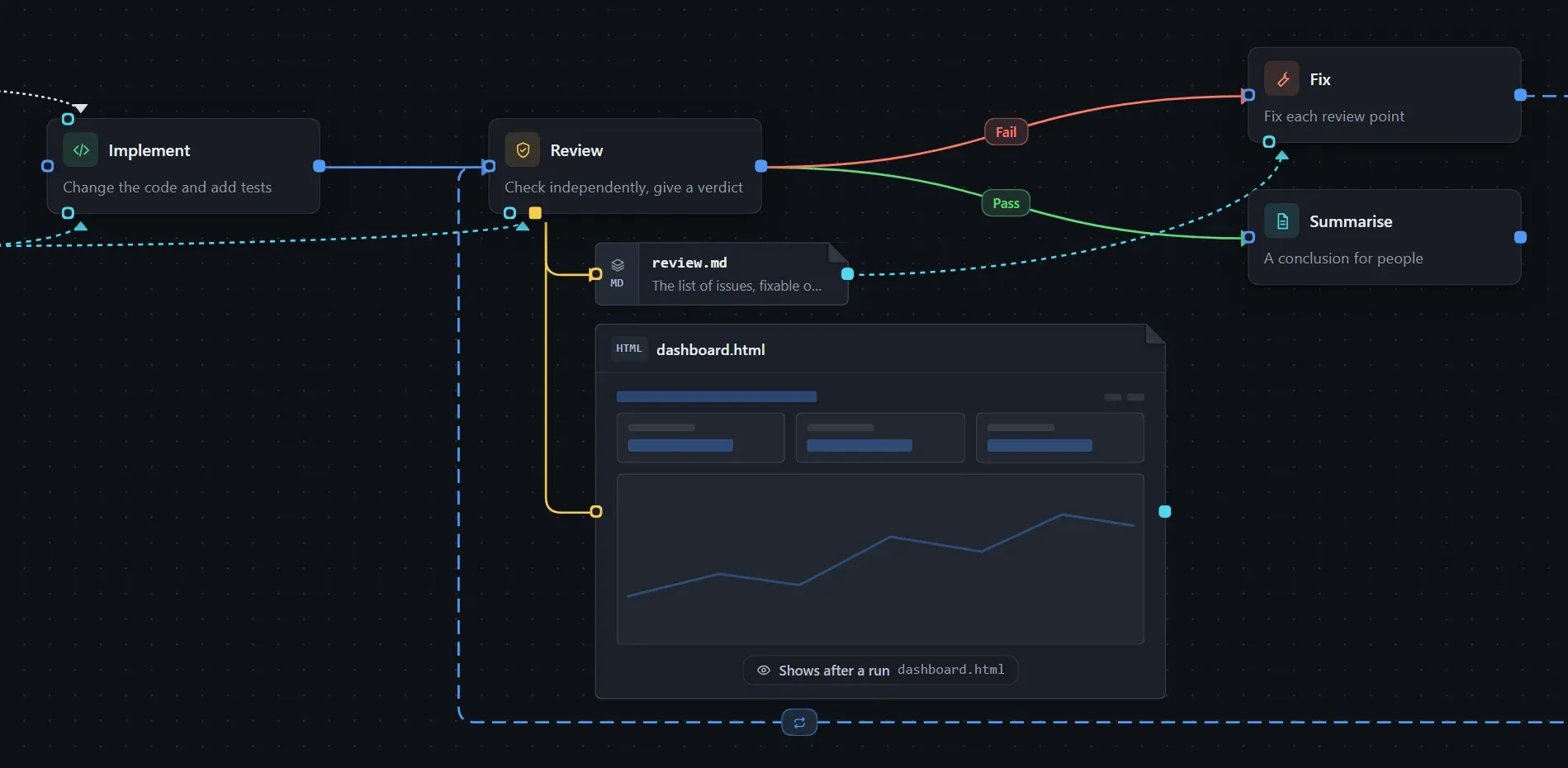
Build it:
- Implement → Review.
- Review → Fix, with the condition Fail.
- Fix → Review, which closes the loop.
- Review → Summarise, with the condition Pass; this is the exit of the loop.
Notes:
- A loop must have an exit. Without one, the plan says there is no exit and the Checks panel warns about it.
- There is no separate “maximum rounds” setting. To limit the rounds, write it in the prompt or a custom condition, such as “the review failed and Fix has run fewer than three times”.
- In an instance, each return to a step adds 1 to its round, shown as “Round N”. Use One more round and One round less in the step panel to adjust it.
- A step that writes an output file saves a version after each round; see Reviewing each round’s output.
- With Record run state on, a run can be resumed after an interruption, from the recorded step and round.
Loops are not limited to code review: “Collect candidate options → Evaluate and filter”, going back for another search round when unsatisfied and summarising when satisfied, works the same way.
Parallel steps and joins
Section titled “Parallel steps and joins”- Parallel: one step has several lines to different downstream steps that do not depend on each other.
- Join: several lines lead to one step, which starts only after all of its upstream steps are done.
Click Preview plan and look at the execution batches: independent steps are in the same batch, a join comes later, and its prerequisites list every upstream step.
Whether they really run at the same time depends on the Execution mode in Workflow settings: Serial finishes them one by one, Main agent + subagents can hand them to subagents together, Agent team lets team members take one each, and Auto leaves it to the main agent.
Conditional lines are mutually exclusive, which is different from parallel. For branches that must run at the same time, use lines with the condition Always.